




Showing posts with label Torrent Speed up. Show all posts

Saturday, December 31, 2011

How to Increase uTorrent, BitTorrent Download Speed

Speed Up uTorrent, BitTorrent

How to Increase uTorrent, BitTorrent Download Speed


Hello my friends!! Here is another speeding up thing...!! I'm sure one day i will face an Accident because of this speed :)
Smiley


      Today I'm going to show you how to Increase torrent Download Speed.and you will be shocked after doing this.I suggest you to follow these steps before you know how to Increase torrent Download Speed.


  1.  Speed Up Internet with Open DNS [Win 7]
  2.  Speed Up Internet with Open DNS [Win XP]

    If you are using dial up connection
  3. Speed up Dial-Up Connection

    Finally
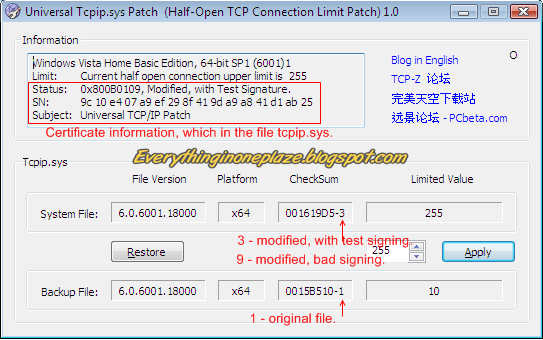
  4. Download Tcpip Patch and patch tcpip.sys to Increase Half open connections


 Now you are ready for increase torrent Download speed

You can apply these Setting to uTorrent and BitTorrent.Most poeple use uTorrent thats why i choose uTorrent For this Tutorial to show how to change settings.But you can apply same settings to BitTorrent. Ok let's Start!!


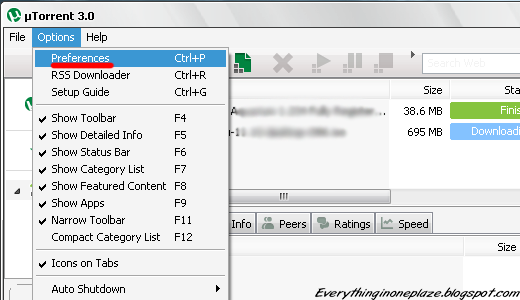
  • Click on "Option"
  • Go to "Preferences"

Speed Up uTorrent, BitTorrent


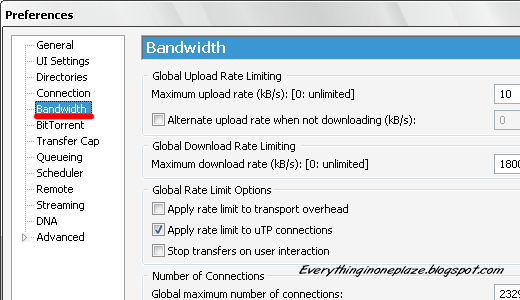
  • Click on "Bandwidth"

Speed Up uTorrent, BitTorrent

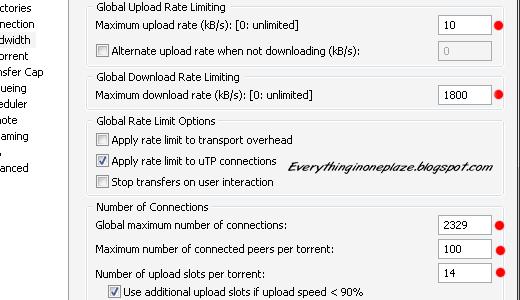
  •  Set
    Maximum Upload Rate : ------------------------------- [ 10 ]  or  [ 15 ]
    Maximum Download Rate : ---------------------------- [ 1800  ]
    Global maximum number of connections : ------------- [ 2329 ]
    Maximum number of connected pees per torrent : ---- [ 100 ] or not more than [ 300 ]
    Maximum upload slots per torrent : -------------------- [ 14 ]                        
  • Leave rest Default

Speed Up uTorrent, BitTorrent

Now  final step
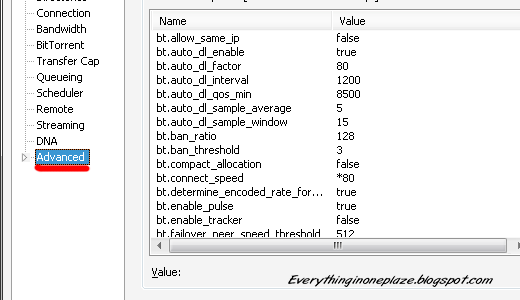
  • Click on "Advanced"
Speed Up uTorrent, BitTorrent

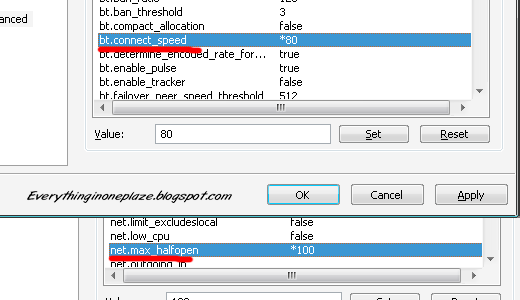
  • Look for "bt.connect_speed" Set it to "80"
  •  Look for "net.max_halfopen" Set it to "100"
    Now All DoNE!! Click on "Apply"
    Exit the uTorrent Application and re Run it.......Feel the new speed
    (Check out the screen shot below)

Speed Up uTorrent, BitTorrent


Before i use this trick my download speed was 200-250kbps.But Now ( not only this trick, I used step 3. and 4 mentioned above) !!! You can see that below :)

     
Click To Zoom
How To Speed Up Internet

Tags:
Read More »

Friday, December 30, 2011

How to Increase p2p Download Speed - Tcpip Patch

Tcpip patch download
       

How to Increase p2p Download Speed - Tcpip Patch


In Windows it allows maximum of 10 half open connections at one time.Its limited by windows for a security reason.Suddenly if your Computer get infected with Virus ,worm or any kind of malware,if half open connections are limited, it slow down spreading them to another computer through the internet.and also reduce the impact of infected systems participating in DOS (Denial of Service) attacks.
                                                                                                                                 And the bad thing is this limit can also slow down P2P applications like "uTorrent, BitTorrent, Vuzu, BitComet, eMule". Because they need to connect to several peers for better Download Speed.When the half open connections limited by windows it can connect to few  peers.That's why we need patch "tcpip.sys" file to expand the limitation and get better Torrent download speed.OK friends lets remove the limitation for forever!!!!


For:
Windows XP Sp2/Vista/Windows 7, 32bit(x86)/64bit

Universal Tcpip.sys Patch, V1.2 

Universal Tcpip Patch Download

Universal Tcpip Patch Download

Meaning of the numbers
1 - Original file, without any modification.
3 - The file has been modified, but with a test certificate.
9 - The file has been modified, but not repair signing. (Windows XP does not compare the signing)


Read the Instructions before applying the patch

Important:
* In Vista / Windows 7, testsigning must set to on," Test mode " watermark may appear in Desktop.
* If " Test Mode " watermark exists on the desktop, apply the patch once again.
* If  it still exists don't try to disable it. let it be there, it won't bite you... Smiley

Create a System restore point before applying the patch
  1. Make sure that you have Administrator Rights modify system files
  2. Run  "UniversalTcpipPatch.exe" as Administrator
  3. Change Value to "100" (Maximum "256", But "100" is more than enough)
  4. Click On "Apply"
  5. Restart the Computer !! And Your Are DoNE..........
    Enjoy the new torrent Download speed


Tcpip Patch For Windows XP SP3
Windows XP SP3 Tcpip Patch Download


Universal Tcpip Patch Download


  1. Open "tcpip-patcher.exe"
  2. Change Value to "100" (Maximum "256", But "100" is more than enough)
  3. Click On "Apply"
  4. Restart the Computer !! And Your Are DoNE..........
    Enjoy the new torrent Download speed

Tags:
how to, How to Increase uTorrent download Speed, How to Increase BitTorrent download Speed, download Tcpip patch download, download Tcpip patch for windows 7, download Tcpip patchwindows xp, Boost uTorrent, Boost BitTorrent, Speed up utorrent, speed up bittorrent, uTorrent, BitTorrent, Vuzu, BitComet, eMule , Boost download speed, fast internet, boost internet, increase download speed, boost p2p, p2p download speed, utorrent settings speed, increase internet download speed, increase speed downloads on utorrent bittorrent, bittorrent utorrent speed boost, increase stuck torrent speed, 
Read More »